
- 22 May 2024
- Marc Smith
- 2
FTTP, FTTC, Starlink or 4G on Skye?
When it comes to internet options, living in a city simplifies things. Fibre to the Premises (FTTP) or Fibre to the Cabinet (FTTC) with copper to your residence are common, hassle-free solutions. However, living in a remote area, such as Skye, presents unique challenges. Although Skye may not feel remote to its residents, suppliers often consider it so, impacting delivery of services, including broadband.
BT/Other commercial products
Copper – They have old fashioned copper (like the Kilbride connection) which is about 4mb. If you plan on going another 7 miles that’s 0.47mb. It’s not really broadband in 2024.
FTTC – They call it fibre but it’s not really. Do you remember HD Ready TV’s? Well, they were not really HD. 720P is like an inbetween. Not awful but also not really HD. Well, BT’s “fibre” FTTC is just fibre to the cabinet and then a copper cable to your home. In 2024 their top speed is 70mb. Which is perfectly adequate for heavy users.
FTTP – FTTP is actual fibre. That is fibre to the cabinet and then another fibre cable to your house. This can be a minimum of 450mbps. They call this Full FIbre, which really means their FTTC should be called half fibre.
Prices vary but with BT depending on the package, but it ranges from £30 – £65. All unlimited which is pretty decent.
Starlink
Starlink is a life saver. Before going any further I want to state that Starlink is only good value when you literally have no other option. Let me explain
Starlink at the time of writing is £75 per month plus £300 for the kit. It’s extremely fast (up to 300mbps) and instant. They are easy to install and easy to set up. So why say they are a last resort? Cost really. Let me explain some of my gripes with Starlink.
Firstly, the cable used is poor. If I had to find a word to describe the cable I’d say limp. If you’ve ever terminated an RJ45 then you’ll know what I mean. It’s also against their installation guidelines to bury the cable. And it comes in two lengths. So whatever way you look at it, you’ll have a loop somewhere with cable lying on the ground.
Their website claims that it can work with winds of 75mph+ but we get 95mph+ at least twice per winter. I can only guess, but I assume this is down to the motor that aligns the dish. If it’s being blasted by high winds too often the motor will burn out as it could be fighting 95mph+ winds for a full day. With this I prefer mounting them on the ground due to the high winds we have here. Less exposed.
Whilst the installation is simple, their proprietary ends means you have to drill a massive 18mm hole in your building instead of a 6mm hole that would suit the cable perfectly. In the Highlands, this could very well mean a 1 metre stone wall. So it’s not very practical.
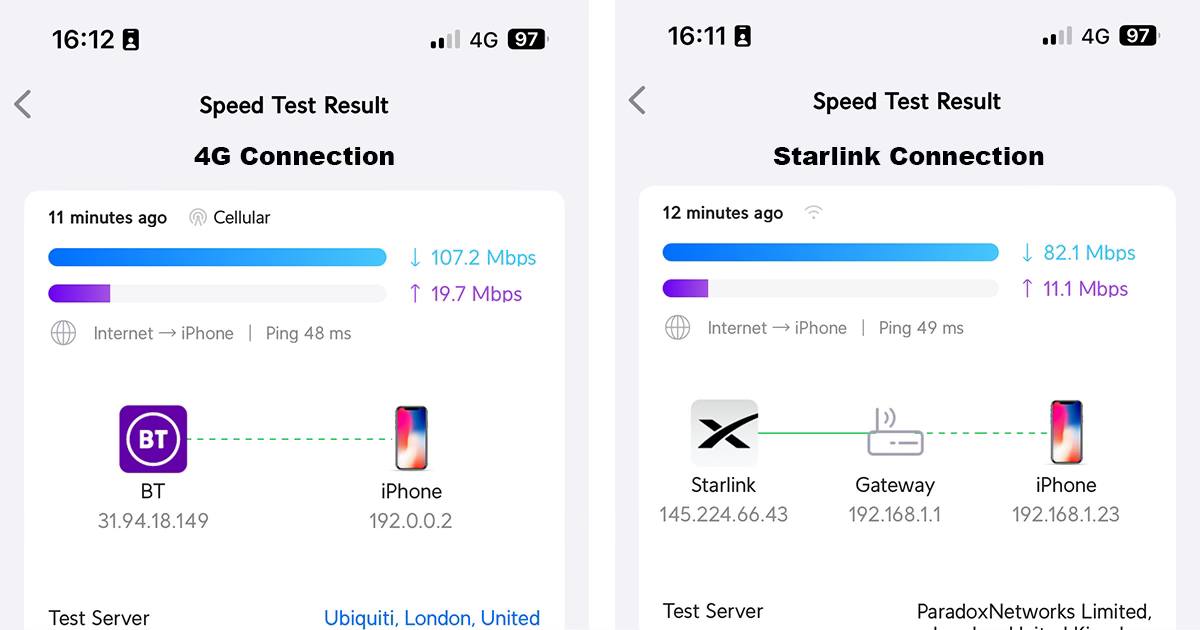
Speeds for Starlink vary. Most of the time it is 100-150+ but sometimes it goes as low as 3. I’ve had a client where it just cut off for a day. No reason for it and nothing on online forums but it just wouldn’t connect. Next day it was fine.
I still love Starlink. 10 years ago when I first moved to Skye this would have been a lifesaver and I totally get it. Even if you have other options it looks like the best option because it’s up to 300mbps. However, let me explain a little further about speeds. It’s not all about the top speed.
4G
What is speed? How much speed do you really need?
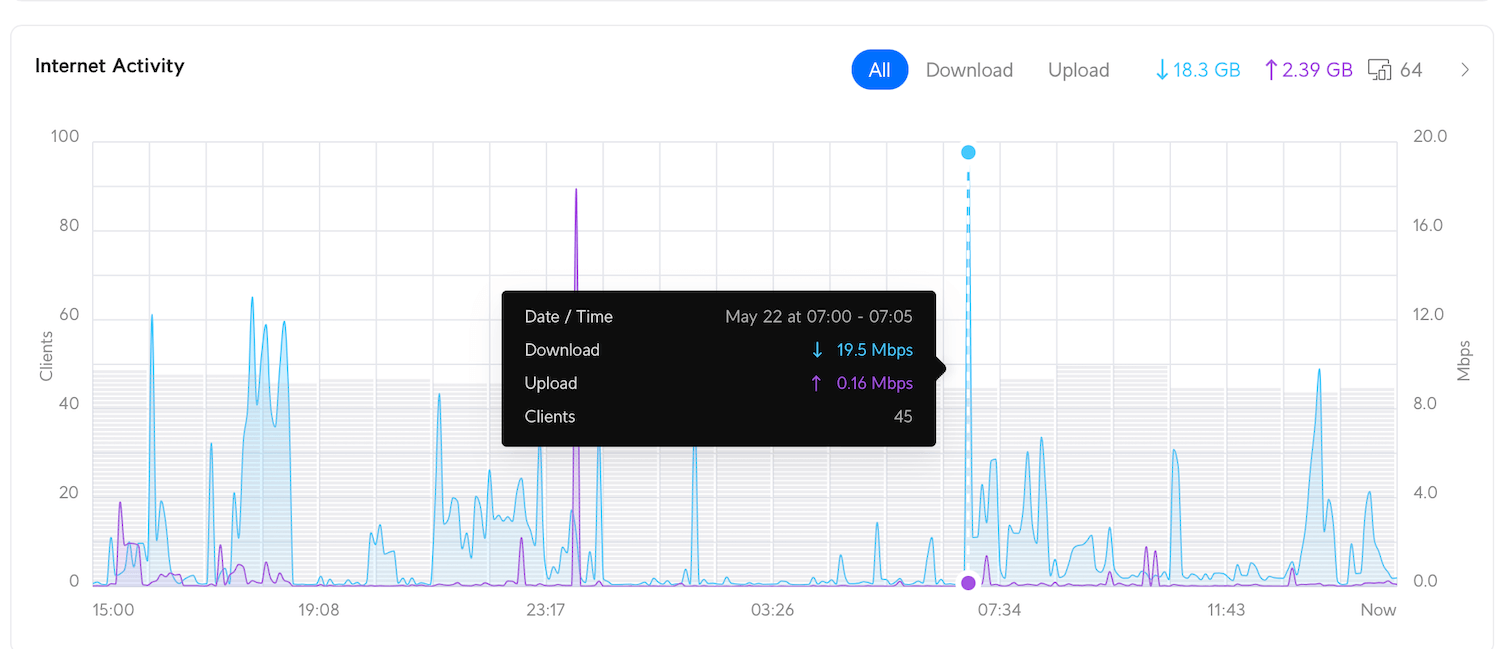
For a family like mine who are incredibly high users with 4K TV’s, iPhones, iPads, every smart device under the sun etc our peak usage is around 20mb. Now, if I was a gamer, what really matters is ping. Ping is how fast your computer can talk to another computer. For example, if you are playing COD, a low ping will mean that when you are shot it’s pretty much live. If you have a high ping, you could be shot and you won’t know about it until it’s too late. Download speed only really enters into the gaming world when you’re downloading the games/updates. Most games are between 50 and 150GB.
If you had a connection of 20mbps it would take 16 hours to download a game of 150GB. With Starlink’s 150mbps it would be 2 hours 13 minutes and with BT’s fastest speed it would be 26 minutes. 4G would come in at 2 hours and 46 minutes if you had 120mbps.
Is the Starlink work it? If you download a game per week then yes, I’d say so, but if not then no. I’d rather be saving £30-£50 per month on an alternative option (if available)
Which takes us on to 4G
4G
So, 4G. I’ve put a few posts up online and there has been a few misinformed comments about how 4G works. Let’s get back to basics. Internet comes in many forms. Cable, satellite and 4/5G. They all come into your house and a router would distribute the signal around to ensure your TV, phone and fridges are connected to the world. 4G is no different. How does 4G work, well without going into too much detail, the signal from the 4G mast is blasted out and picked up by a device capable of receiving it. Mostly phones. But, get this, you can put a data sim card in a router that converts that 4G signal into WiFi. You can have as many devices connected to your router and it will work just fine. You are limited to speeds from the 4G network which can vary depending on how busy the area is. WIth the last 3 4G installs I have completed speeds were between 130 and 193mbps.
What’s the cost of this? Kit is £240 + around £13 per month using the pre-paid data cards from Amazon. So excellent value. And the plus side of this is that you can take your router anywhere you go for free (unlike cable or Starlink).
Hopefully this gives you a good overview of your options. I’ve tried to keep it as simple as possible and give you the actual speed tests to showcase actual real world usage.
Hi,
I have 2 holiday lets in the Uig area they are close to each other and have BT broadband and TV services in both. We have broadband, TV and a sport package with BT and it works, albeit its fibre to cabinet and broadband is slow. It still costs over £40 for each broadband account, and so £80/month is being demanded for terribly slow broadband.
I visited last week and got faster speeds on 4G (Vodafone) and it seems obvious that using 4G would be preferable for speed and most likely cost. I’m interested in a better solution and wondered if you could help.
Kind regards
David
Thank you for the comment. I’ve emailed you directly. Thanks.